




You ask your agent for the prices of 40 products. Two minutes later you get a tidy JSON table.
Some of the prices came from search snippets, a few came from a Cloudflare "Just a moment..." page the agent read as a product page, and one price doesn't exist anywhere on the site.
Nothing threw an error. That's what makes AI agents in web scraping tricky: the failures look like success, and you only find out when someone acts on the numbers.
Swapping in a bigger model rarely changes the outcome.
What changes it is knowing which of five failure modes you're hitting, then moving that part of the job out of the model and into code you control.
In this guide, I'll break down the five problems, how an agent differs from plain LLM extraction, and the patterns that hold up when the job runs every day.
If you're new to scraping itself, read what web scraping is and how a scraper is put together first.
What goes wrong with AI agents in web scraping?
AI agents in web scraping fail in five predictable ways: raw HTML overflows the context window, anti-bot systems block the agent without it noticing, the model invents fields that aren't on the page, runs don't repeat, and the agent ignores robots.txt and site terms. Each fix moves one job from the model into deterministic code.
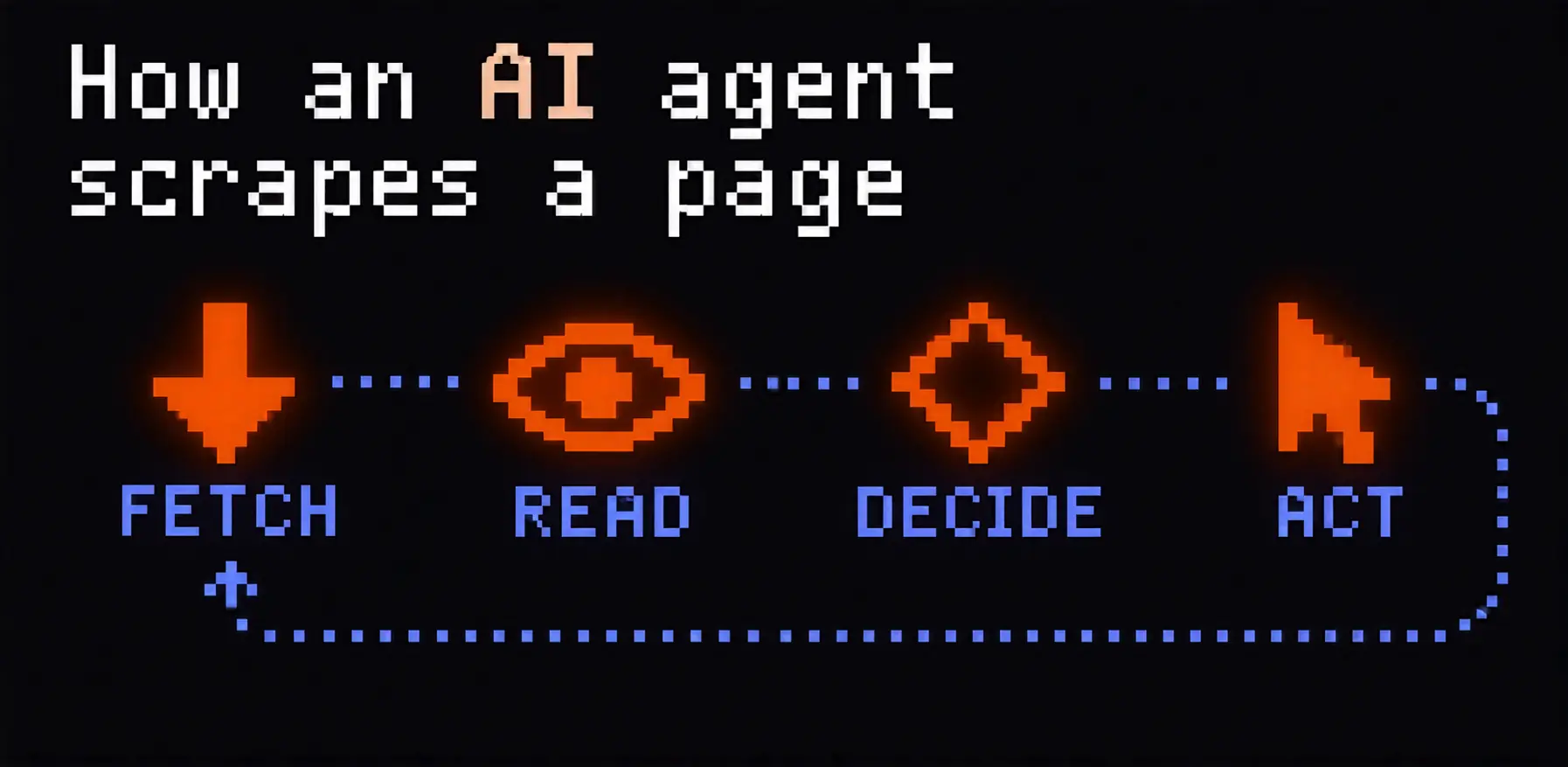
An AI scraping agent is a loop. The model reads the page (as HTML, an accessibility snapshot or a screenshot), picks an action such as click, scroll or extract, and repeats until it decides it's done.
That loop is what makes agents adaptable. It's also what makes them slow, expensive per page and hard to audit, because every step is a fresh decision.
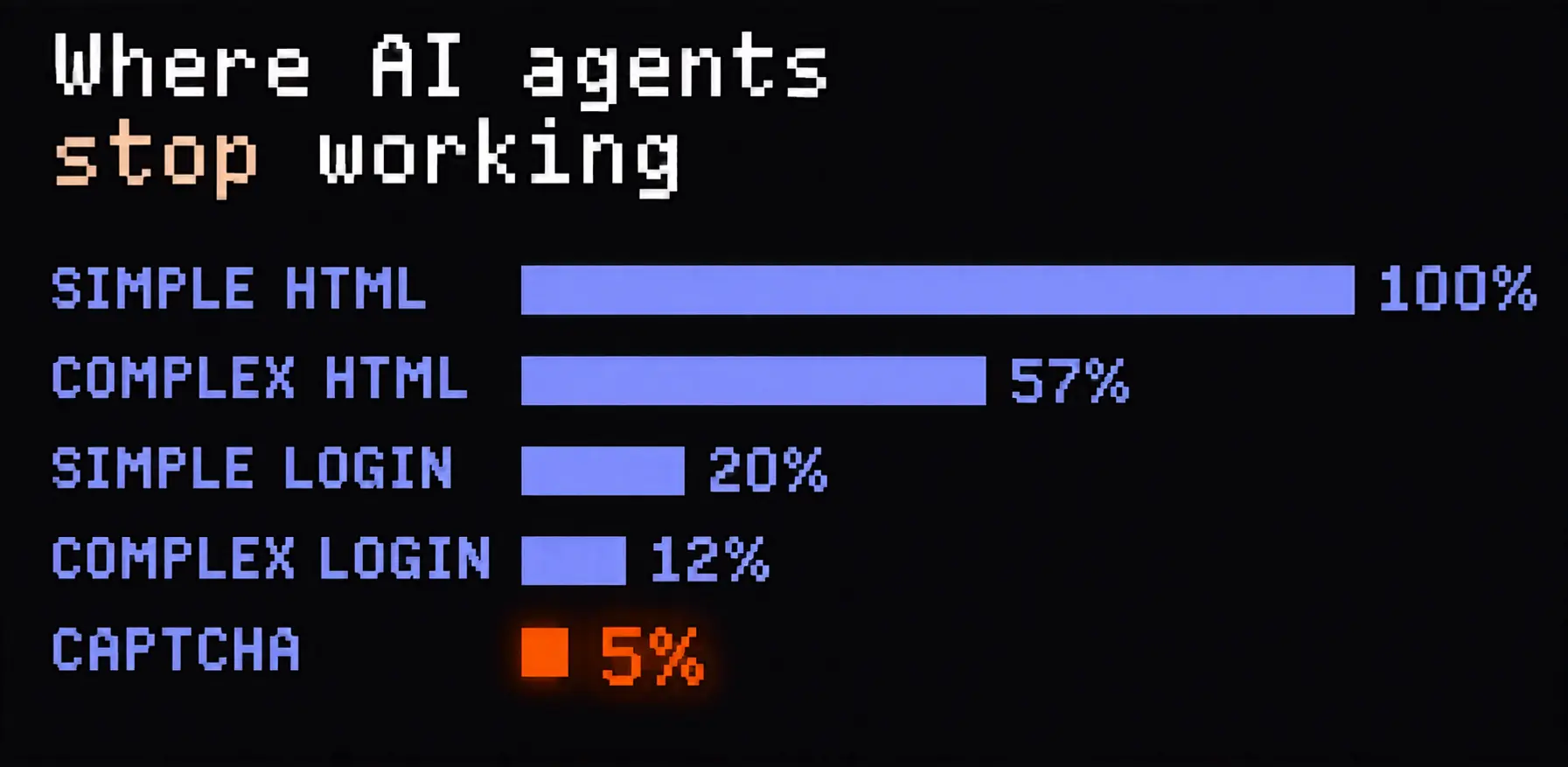
The research backs this up. In the Beyond BeautifulSoup benchmark (35 sites, January 2026), a Claude 3.5 Sonnet agent extracted 100% of simple HTML pages but only 12% behind complex logins and 5% on CAPTCHA pages.
Speed showed the same split. Agents needed 10 to 20 seconds per simple page, while scripts finished in under 2. It's a small sample with an older model, so read the figures as direction, not precision.
AI scraping agents vs. LLM extraction vs. AI-written scrapers
These three get lumped together as "AI scraping," and the difference decides what you pay per page.
| Concept | What it actually is | When you'd use it | Example |
|---|---|---|---|
| AI scraping agent | An LLM in a loop that drives a browser or fetch tool and picks the next step itself | Unknown sites, multi-step flows, logins, one-off research | Browser Use clicking through a store's filters |
| LLM extraction | Your code fetches the page; the model only turns cleaned text into JSON | Messy layouts where selectors keep breaking, moderate volume | A cleaned product page sent to a local model with a schema |
| AI-written scraper | The model writes a normal scraper once; you run it without the model | High volume on a stable site | A model writes a BeautifulSoup script you run every day |
| MCP browser tool | Plumbing that gives an agent a browser. It isn't a scraping method on its own | Connecting Claude, Cursor or your own agent to a browser | Playwright MCP returning accessibility snapshots |
Here's how they fit together. Say you need daily prices from 300 product pages on one store.
An agent maps the site once: where the price lives, how pagination works, what "out of stock" looks like. It got its browser through an MCP tool.
From then on, a plain scraper (or a selector spec the agent wrote) runs the 300 pages every morning with no model in the loop. LLM extraction handles the handful of pages with an odd layout.
That split matches the benchmark. For static content, the authors found the agents' 15 to 20 times longer runtime bought no benefit at all.
The 5 problems AI scraping agents hit
The five problems are token bloat, silent blocks, invented data, runs that don't repeat and broken rules, roughly in the order you'll run into them.
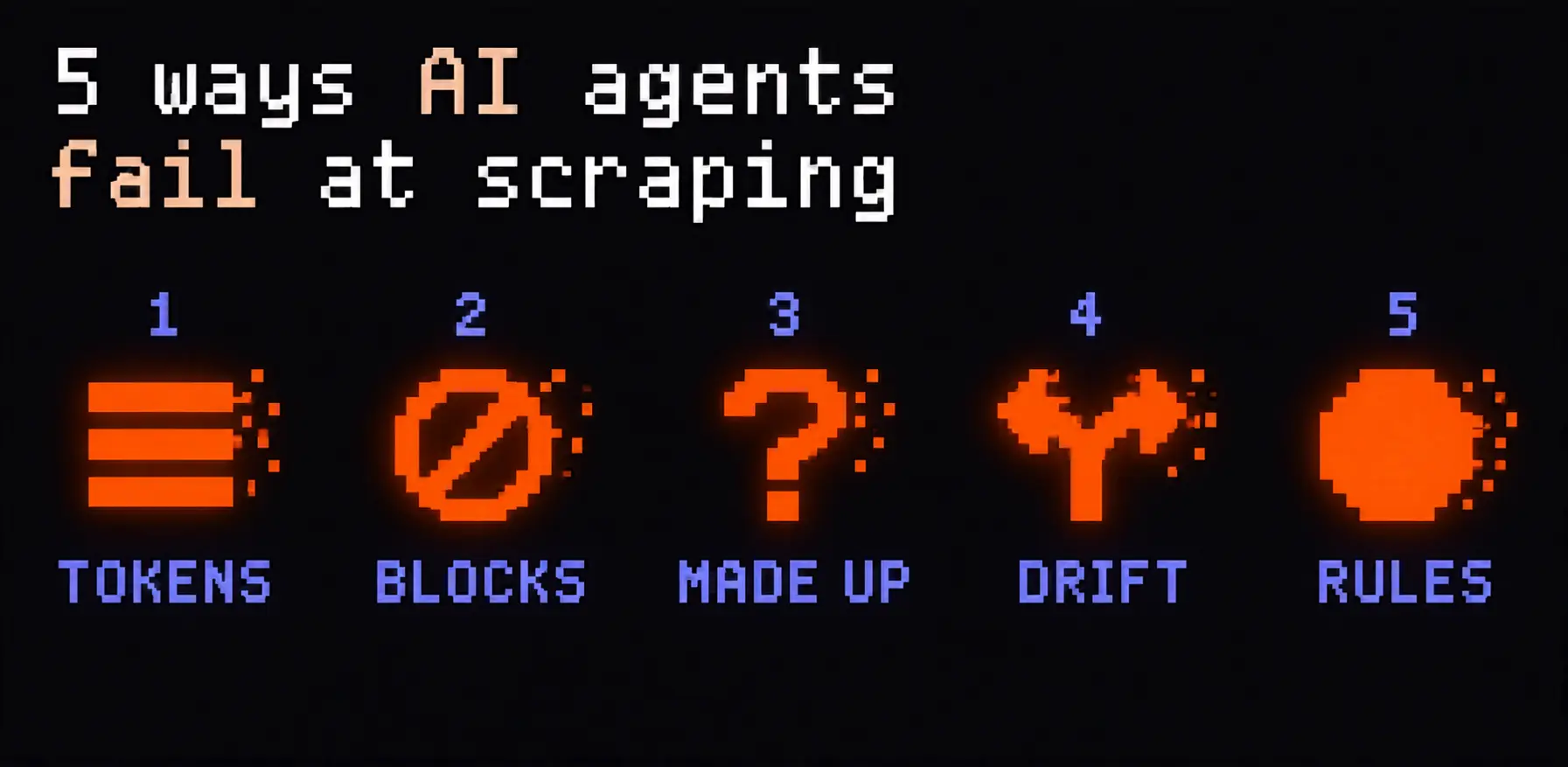
| Problem | What you see | Fix in code | Evidence |
|---|---|---|---|
| 1. Token bloat | Slow, costly steps; the model misses fields | Strip the page before the model reads it | Pages of hundreds of thousands of tokens (Zyte) |
| 2. Silent blocks | Challenge pages summarized as data | A fetch gate that raises on blocks | Agents hit 5% on CAPTCHA pages (Beyond BeautifulSoup) |
| 3. Invented data | Valid JSON, wrong values | Check every value against the source text | An invented 4.6 rating passes any schema |
| 4. Runs don't repeat | Different paths and results each run | Step caps plus a frozen extraction spec | Trial-and-error loops (Zyte) |
| 5. Rules ignored | Prohibited sites scraped, injected instructions followed | Allowlist and robots.txt checks in the tool | Under 5% compliance (ScrapeBench) |
1. Raw HTML burns the context window
Pages are far bigger than the data you want. Zyte's team reports pages that run to hundreds of thousands of tokens, with some past a million.
Most of that is scripts, inline CSS, SVG icons and tracking markup. You pay for it on every step, and the one price you care about ends up buried between a cookie banner and a JSON blob.
Snapshots help. Our Playwright MCP setup guide measures accessibility-tree snapshots at roughly 200 to 400 tokens, against thousands for screenshots or raw DOM.
Where you'll hit this:
- Product and listing pages that ship their state as a large inline JSON blob
- Agents that pass
page.content()straight to the model - Long sessions where every step re-sends the whole page
How it works in practice: strip the page before the model sees it. This uses lxml and gives you a rough token count to log before and after.
from lxml import html

DROP = ("script", "style", "noscript", "svg", "iframe", "template", "nav", "footer")

def clean_for_llm(raw: str) -> str:
    tree = html.fromstring(raw)
    for el in list(tree.iter(*DROP)):    # list() first: we mutate the tree while looping
        el.drop_tree()
    root = (tree.xpath("//main") or tree.xpath("//body") or [tree])[0]
    return " ".join(" ".join(root.itertext()).split())  # join text nodes, collapse whitespace

def approx_tokens(text: str) -> int:
    return len(text) // 4                # rough rule of thumb for English text
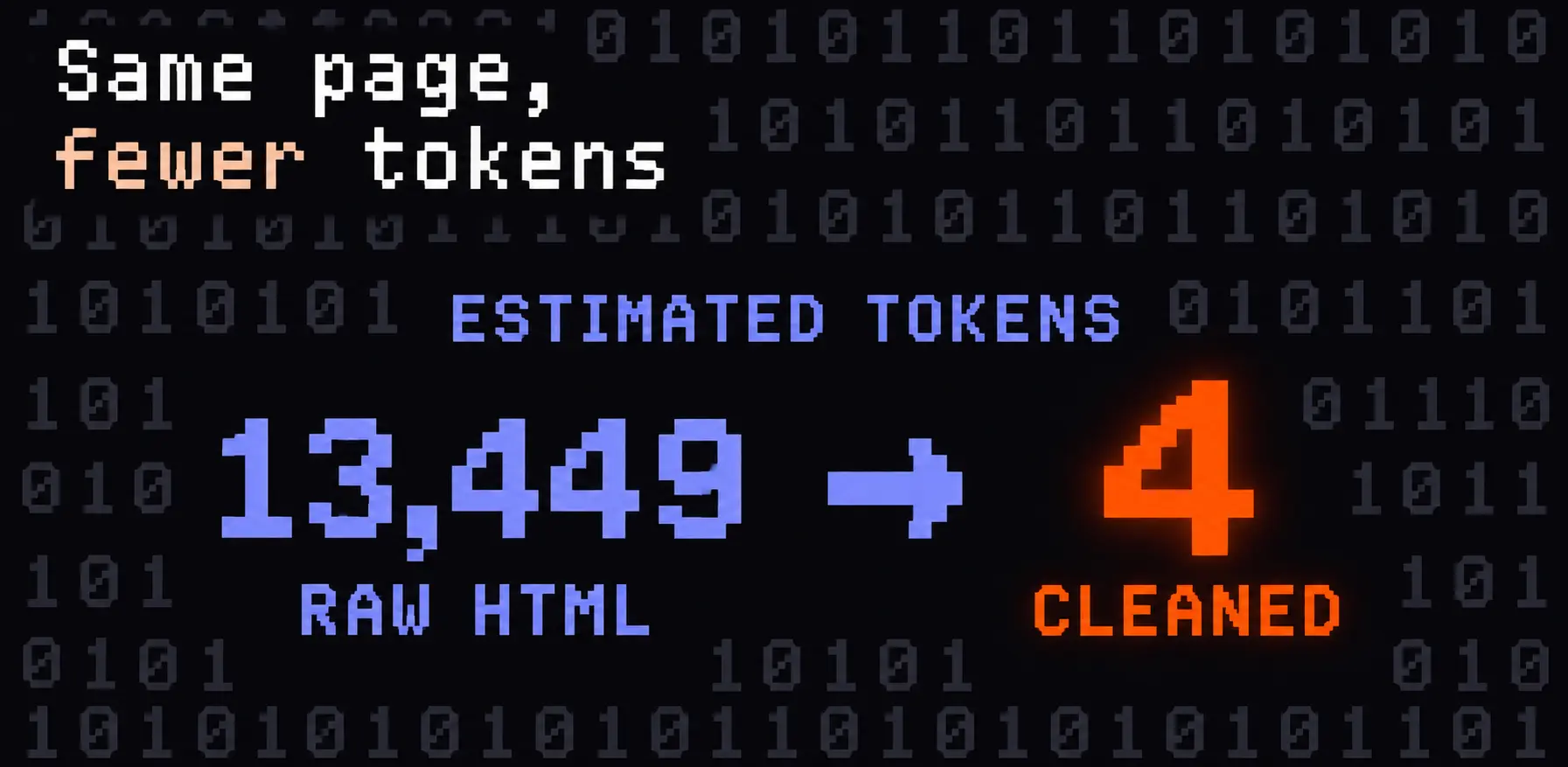
On a synthetic test page (a product name and price padded with 52 KB of inline script and CSS), the estimate dropped from about 13,400 tokens to 4.
Real pages won't shrink that far, but scripts and styles are usually the bulk.
If your cleaned text is still large, narrow the root to the product container. That container's selector is exactly what the agent should learn once and hand to code.
2. The agent gets blocked and doesn't notice
Anti-bot systems don't care that your traffic is "an agent." They see a headless browser or an HTTP client whose TLS handshake doesn't match its User-Agent, and they answer with a challenge page, a 403 or a degraded page.
The layers that get scrapers blocked are the same for agents. The agent-specific part is what happens after the block.
The model reads "Just a moment..." or a login modal and summarizes it as if it were the content. Our Stealth Browser MCP guide walks through that failure on Cloudflare sites.
Where you'll hit this:
- Sites behind Cloudflare, DataDome, Akamai or similar bot management
- Agents whose fetch tool is plain
requests,httpxorfetch - Agents running from cloud or datacenter IP ranges
How it works in practice: find out what you're up against first. antibot-detect (mmewni/antibot-detect on GitHub) makes one browser-like request and reports which bot-management product a site runs, with the evidence. Run antibot-detect https://shop.example.com --verbose.
It's passive: one request, headers, cookies and HTML. A clean result doesn't prove the site is unprotected, because JavaScript-only checks won't show up without rendering.
Then put a gate between the fetch and the model, so a block becomes an exception instead of data. This version fetches with primp, which impersonates a real browser's TLS and HTTP/2 handshake.
import primp

CHALLENGE_MARKERS = ("just a moment", "verify you are human", "access denied",
                     "enable javascript and cookies", "captcha")

class BlockedError(Exception):
    pass

client = primp.Client(impersonate="chrome_146")   # browser-grade TLS + HTTP/2 handshake

def fetch_or_raise(url: str, min_bytes: int = 2_000) -> str:
    resp = client.get(url)
    body = resp.text
    if resp.status_code in (403, 429, 503):
        raise BlockedError(f"{url}: HTTP {resp.status_code}")
    head = body[:5_000].lower()                    # challenge text sits near the top
    if len(body) < min_bytes or any(m in head for m in CHALLENGE_MARKERS):
        raise BlockedError(f"{url}: challenge page or empty shell")
    return body
Give the agent fetch_or_raise as its only fetch tool, so a block lands in your logs as a block.
Tune the markers per site: "captcha" alone fires on login pages that merely load a CAPTCHA script.
primp's profile names follow browser releases (the README currently lists chrome_144 through chrome_153), so check the one you pin. It isn't the only option either.
- curl_cffi: the same job with a requests-style API in Python.
- tls-client: the pick when your agent's tools are written in Go.
- hellojs: covers Node agents where axios or fetch get flagged on fingerprint alone.
If the blocks turn out to be IP-based rather than fingerprint-based, residential IPs fix that layer (we sell those at Roundproxies). Nothing else in this guide depends on them.
3. Confident, wrong data
LLMs fill gaps. Ask for price, rating and stock on a page that only shows a price, and you may get all three back.
Schema validation won't catch it. A made-up rating of 4.6 is a perfectly valid float, so the JSON passes and the bad value ships.
The fix is grounding: every value the model returns must appear in the text you sent it. If it isn't on the page, it isn't data.
Where you'll hit this:
- Products with missing fields, like no reviews yet
- Lazy-loaded sections the agent never scrolled to
- Variant pages where the model mixes up two sizes or colors
How it works in practice: pydantic checks the shape, and a second function checks that each value exists in the cleaned source.
from pydantic import BaseModel

class Product(BaseModel):
    name: str
    price: str | None = None     # keep the raw string; parse after grounding
    rating: str | None = None

def norm(s: str) -> str:
    return " ".join(s.split()).lower()

def ungrounded_fields(item: Product, source_text: str) -> list[str]:
    haystack = norm(source_text)
    return [field for field, value in item.model_dump().items()
            if value is not None and norm(str(value)) not in haystack]

# item = Product.model_validate_json(llm_output)
# for field in ungrounded_fields(item, cleaned): set it to None, or re-ask the model
Run against the cleaned test page from problem 1, this flags an invented rating of "4.6" and lets the real "$1,299.00" price through.
Keep values as raw strings until after this check. Ask the model for a float and "$1,299.00" comes back as 1299.0, which you can no longer match against the page.
Also tell the model that null is allowed. In my experience, most invented fields come from prompts that make every field sound required.
4. Runs don't repeat
Agents choose a path at runtime, so the same prompt on the same site can take different clicks. Zyte lists trial-and-error loops where agents lose track of the goal, plus reproducibility problems from A/B tests, client-side rendering and lazy loading.
That's fine for a one-off research question. It breaks a dataset you compare day to day, because you can't tell a site change from an agent that took a different route.
Where you'll hit this:
- Scheduled jobs whose output gets compared run to run
- Pagination that the agent handles as "load more" one day and page numbers the next
- Runs that suddenly cost five times more because the agent got lost
How it works in practice: set a hard step limit in whatever framework you use and log the step count per run. Then have the agent produce an extraction spec instead of data, and run that spec with plain code.
import json
from lxml import html

# Written once by the agent after exploring the page, reviewed by you like a PR
SPEC = json.loads("""{
  "item":   "//div[contains(@class, 'product-card')]",
  "fields": {"name":  ".//h2//text()",
             "price": ".//*[contains(@class, 'price')]//text()"}
}""")

def run_spec(raw: str, spec: dict) -> list[dict]:
    rows = []
    for node in html.fromstring(raw).xpath(spec["item"]):
        row = {}
        for field, xpath in spec["fields"].items():
            parts = [t.strip() for t in node.xpath(xpath) if t.strip()]
            row[field] = " ".join(parts) or None   # None, never a guess
        rows.append(row)
    return rows
Same input, same output, zero tokens. The agent only comes back when the spec stops working, which is the loop two sections down.
"The question I ask about every agent scraper: what happens on run 31? If the answer is 'the agent works it out again,' you're paying for the same discovery 30 times, and you can't diff the results." (Marius Bernard)
5. The agent ignores the rules
Agents don't reliably follow scraping rules, even after reading them. The ScrapeBench study sent agents to 1,626 popular sites that prohibit scraping, and most agents complied less than 5% of the time.
Checking the terms and robots.txt first barely helped. The opposite failure showed up too: on 269 sites that allow scraping, Claude Opus 4.6 refused 98.5% of the time.
Pages can also give your agent instructions. The TRAP benchmark found web agents fell for prompt injection in 25% of tasks on average, from 13% for GPT-5 to 43% for DeepSeek-R1.
For a scraper, that means a product review can tell your agent to visit another URL or rewrite its output. Pages full of user content, like reviews and forums, are where this lives.
Where you'll hit this:
- Prompts with open scope, like "collect everything about this company"
- Agents that hold write tools (shell, files, email) and a browser in the same session
- Review, forum and marketplace pages full of text anyone can post
How it works in practice: enforce the rules in the tool, where the model can't talk its way around them.
from urllib import robotparser
from urllib.parse import urlparse

ALLOWED_HOSTS = {"shop.example.com"}       # the agent can't wander off-domain
USER_AGENT = "acme-price-bot/1.0 (+https://acme.example/bot)"
_robots: dict[str, robotparser.RobotFileParser] = {}

def allowed(url: str) -> bool:
    host = urlparse(url).netloc
    if host not in ALLOWED_HOSTS:
        return False
    if host not in _robots:
        rp = robotparser.RobotFileParser(f"https://{host}/robots.txt")
        rp.read()                          # fetched once per host, then cached
        _robots[host] = rp
    return _robots[host].can_fetch(USER_AGENT, url)
Wrap the agent's fetch tool in allowed() and return a refusal string when it's False. The model never gets a vote.
Robots.txt isn't the whole picture, so read the site's terms yourself before an agent goes near it.
How to build an AI scraping agent that holds up
Use the agent to explore and code to repeat. The agent maps the site once, your code runs the extraction, and the agent comes back only when the code breaks.
1. Let the agent explore, then freeze the result
The agent's deliverable is a spec (selectors, pagination rule, a few sample rows), not the dataset. Review it like a pull request before it goes into the scheduler.
Any agent framework you run yourself works for this. Browser Use and Stagehand drive a browser, Skyvern targets form-heavy flows, and Crawl4AI handles LLM-ready extraction. All four are open source and self-hostable.
2. Gate every fetch before the model sees it
Chain fetch_or_raise() and clean_for_llm() in front of the model. It receives cleaned text or nothing, never a challenge page.
3. Check values against the page, not just the schema
Run ungrounded_fields() on every extraction. Set ungrounded fields to null and count them. A rising count tells you the prompt or the page changed.
4. Enforce rules in the tool layer
Allowlisted hosts, robots.txt checks and read-only tools sit in code. Keep the browser and any write tools (shell, files, email) in separate sessions, so an injected instruction has nothing to call.
If you run an agent that sites should be able to recognize, look at Web Bot Auth, an IETF draft that lets agents sign their HTTP requests.
Cloudflare publishes open-source signing libraries for Rust and TypeScript.
5. Start with one site and a fill-rate check
Skip the multi-agent planner for now. One site, one spec, a step cap and the fill-rate check below will teach you more in a week than an orchestration framework will in a month.
For the full build with a model in the extraction loop, including chunking and cost controls, see our Claude web scraping tutorial.
The self-healing loop: call the agent only when the data drifts
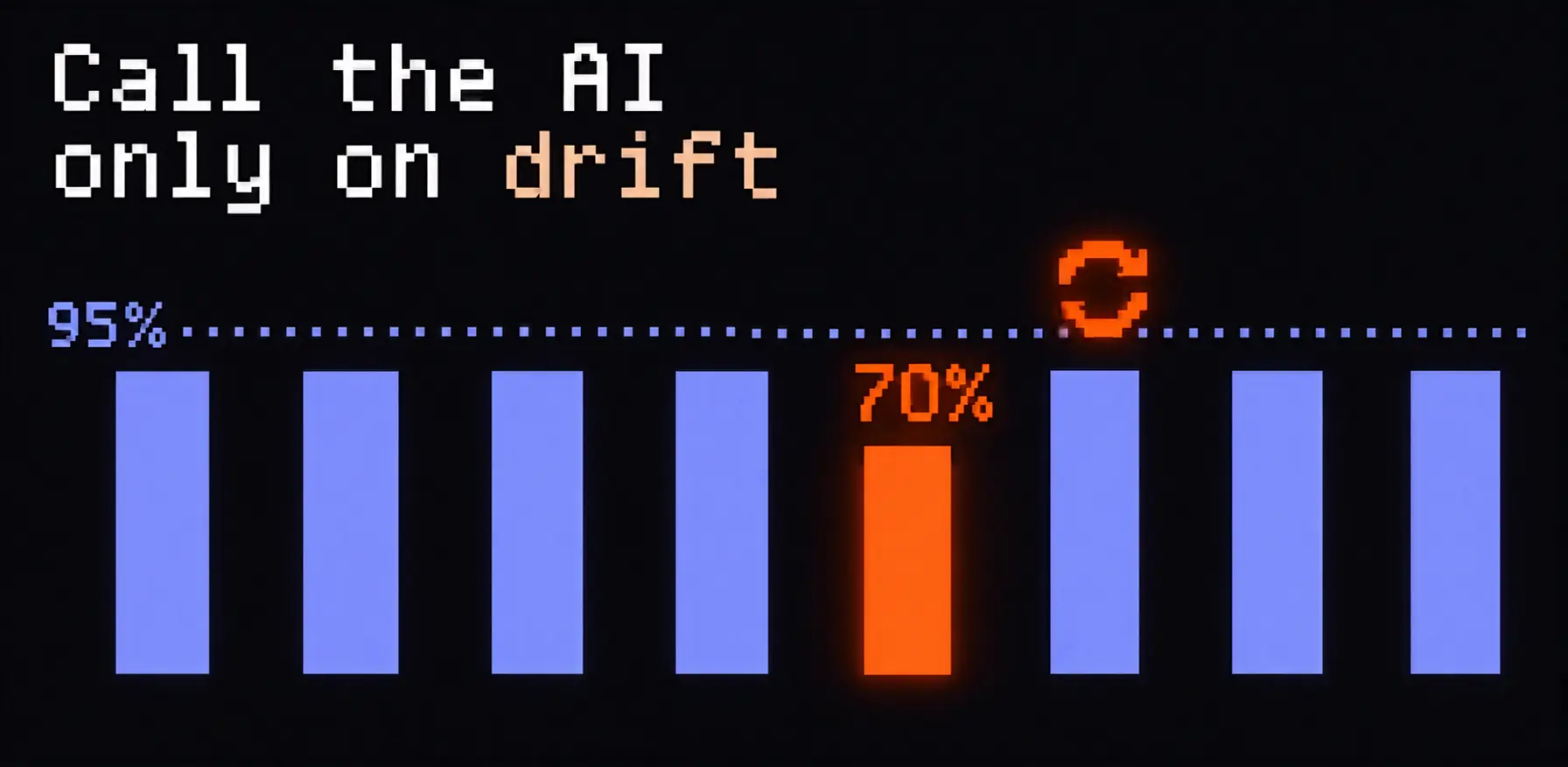
A self-healing scraper runs the frozen spec every time and calls the agent only when a field's fill rate drops below a threshold. You pay for the model on the rare day the site changes, not on every run.
The signal is simple. If price is filled on 99% of rows yesterday and 70% today, the layout changed, even though every request returned 200.
from typing import Callable

def fill_rates(rows: list[dict], fields: list[str]) -> dict[str, float]:
    if not rows:
        return {f: 0.0 for f in fields}
    return {f: sum(r.get(f) is not None for r in rows) / len(rows) for f in fields}

def scrape(raw: str, spec: dict, rediscover: Callable[[str], dict],
           min_fill: float = 0.95) -> tuple[list[dict], dict]:
    rows = run_spec(raw, spec)
    rates = fill_rates(rows, list(spec["fields"]))
    if min(rates.values()) < min_fill:     # layout drift, even on HTTP 200
        spec = rediscover(raw)             # your agent call: returns a new spec dict
        rows = run_spec(raw, spec)
    return rows, spec                      # save the spec for the next run
rediscover is wherever your agent lives: a Browser Use task, a Stagehand script or one model call that gets the cleaned page and returns JSON in the SPEC format.
Two details matter. Blocks never reach this function, because fetch_or_raise() already raised. So an empty page can't trigger a pointless rediscovery.
And version every spec you save. When the numbers move, you can then tell a site change from a scraper change in one diff.
AI agents in practice: three workloads
Which problem dominates depends on the job. Here's how the five play out in three common setups.
E-commerce price monitoring
High volume on a few stable sites means problems 1 and 4 dominate. Agent once, spec daily, fill-rate watchdog.
A redesign drops price fill to 0.6. Rediscovery runs once, a new spec gets saved, and the 300 pages are back on plain code the same morning.
Lead lists and research across many small sites
Many sites with a few pages each is where an agent earns its cost, since there's no spec worth freezing. Problem 3 dominates.
Run LLM extraction per page and keep the grounding check strict. A contact email that isn't on the page is worse than no email.
Logged-in dashboards
Authentication is where agents are weakest. In the Beyond BeautifulSoup benchmark, Claude's agent managed 20% on simple logins and 12% on complex ones; Simular.ai reached 63 to 70%.
Let a human do the login in a persistent browser profile, then let the agent navigate. Only do this on accounts you own and are allowed to automate.
Agent scraping pitfalls (and how to avoid them)
Most agent scraping failures come from using the agent for jobs code does better. These are the ones I see most.
Send static pages to a script, not an agent
If the data is in the raw HTML, a request plus a selector wins on every axis. The benchmark found agents' 15 to 20 times longer runtime brought no benefit on static content.
Don't count on agents to get past CAPTCHAs
This is where agents don't help at all. The benchmark measured 5% success for Claude and 10% for Simular.ai on CAPTCHA pages, and no prompt changes that. Treat a CAPTCHA as a stop signal and route around it.
Keep the browser and the shell apart
An agent with a browser and a shell in one session can be talked into running what a page tells it. Give scraping agents read-only tools and nothing else.
Log the step count, not just the result
Output can look normal while the agent took 40 steps instead of 8. Step count per run is the earliest drift signal you'll get, and it costs one log line.
FAQ
Can AI agents scrape websites?
Yes, AI agents can scrape websites, including logins and multi-step flows that plain scripts can't handle.
They're slower and less predictable, though. Use them to explore a site, and let code handle the repeat runs.
Can ChatGPT scrape websites?
ChatGPT can read web pages through its browsing and agent features, but it's a poor fit for scraping at volume.
You don't control the fetch layer, results vary between runs, and sites block it like any other agent. For repeatable data, have it write a scraper that you run yourself.
Is AI web scraping legal?
Using AI doesn't change the legal picture: site terms, robots.txt, copyright and data-protection law apply the same way they do to any scraper.
What changes is the risk, because agents rarely follow those rules on their own. Enforce the rules in code, and read the terms yourself (this isn't legal advice).
What is the best AI agent for web scraping?
There's no single best one, because the architecture matters more than the framework.
Open-source options you can run yourself include Browser Use and Stagehand for browser control, Skyvern for form-heavy workflows and Crawl4AI for LLM-ready extraction.
Whichever you pick, use it to write specs, not to extract every page.
Are AI agents slower than traditional scrapers?
Yes, AI agents are much slower than traditional scrapers on simple pages.
One 35-site benchmark measured 10 to 20 seconds per simple page for agents against under 2 seconds for scripts. Every step waits on a model call, and browser-driving agents add rendering time on top.
Wrapping up
Agents for discovery, code for repetition. That one rule covers most of the five problems.
Start with the cheapest win: put fetch_or_raise() and ungrounded_fields() around the agent you already run, and log what they catch for a week.
Then freeze your first spec and add the fill-rate check. If your agent works through an MCP browser, the Stealth Browser MCP guide covers the browser side.